emqutiti
Activity
Contributors
README
Emqutiti
Emqutiti is a polished MQTT client for the terminal built on
Bubble Tea. Profiles live in
~/.config/emqutiti/config.toml so you can switch brokers with a few key presses.
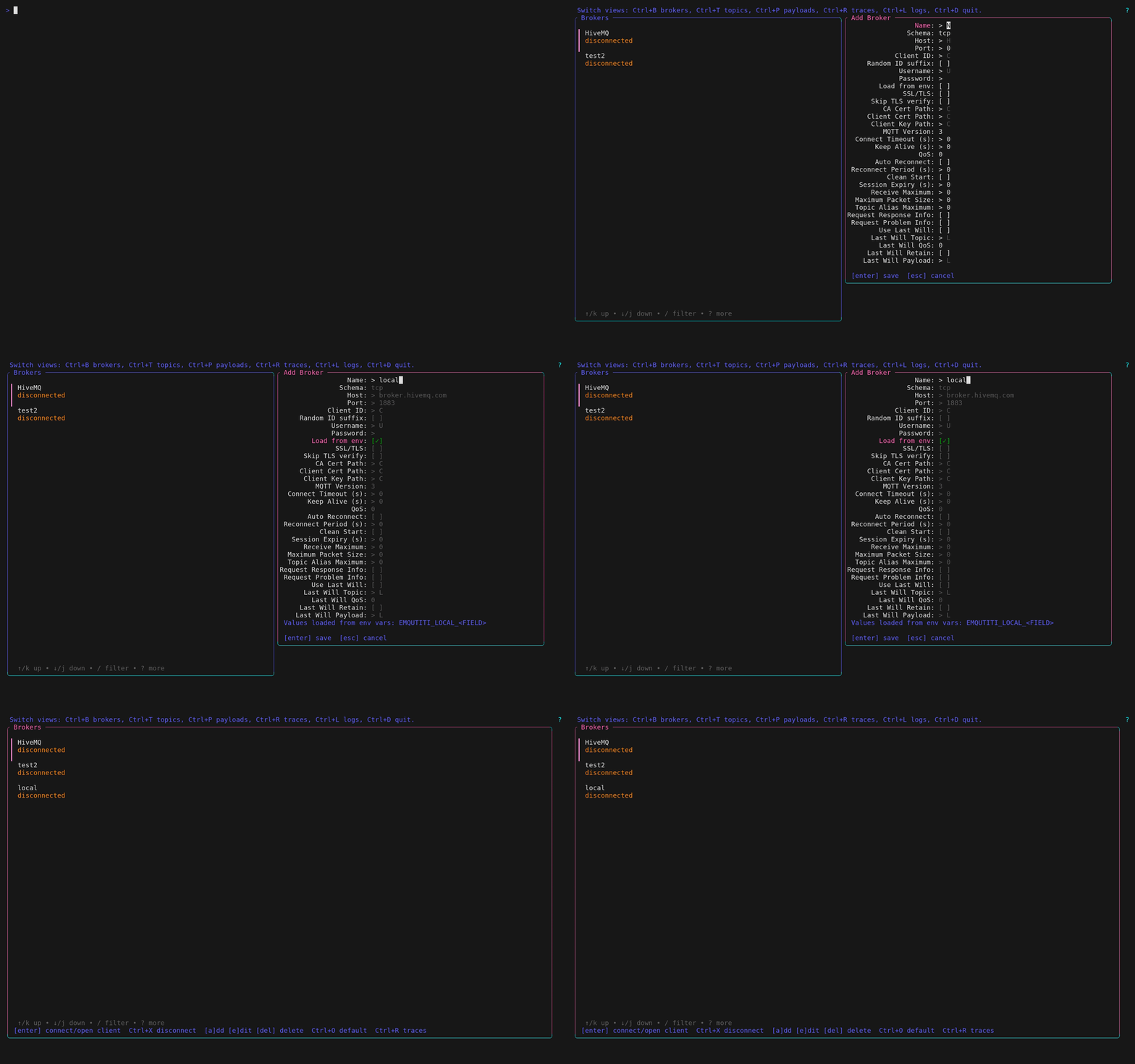
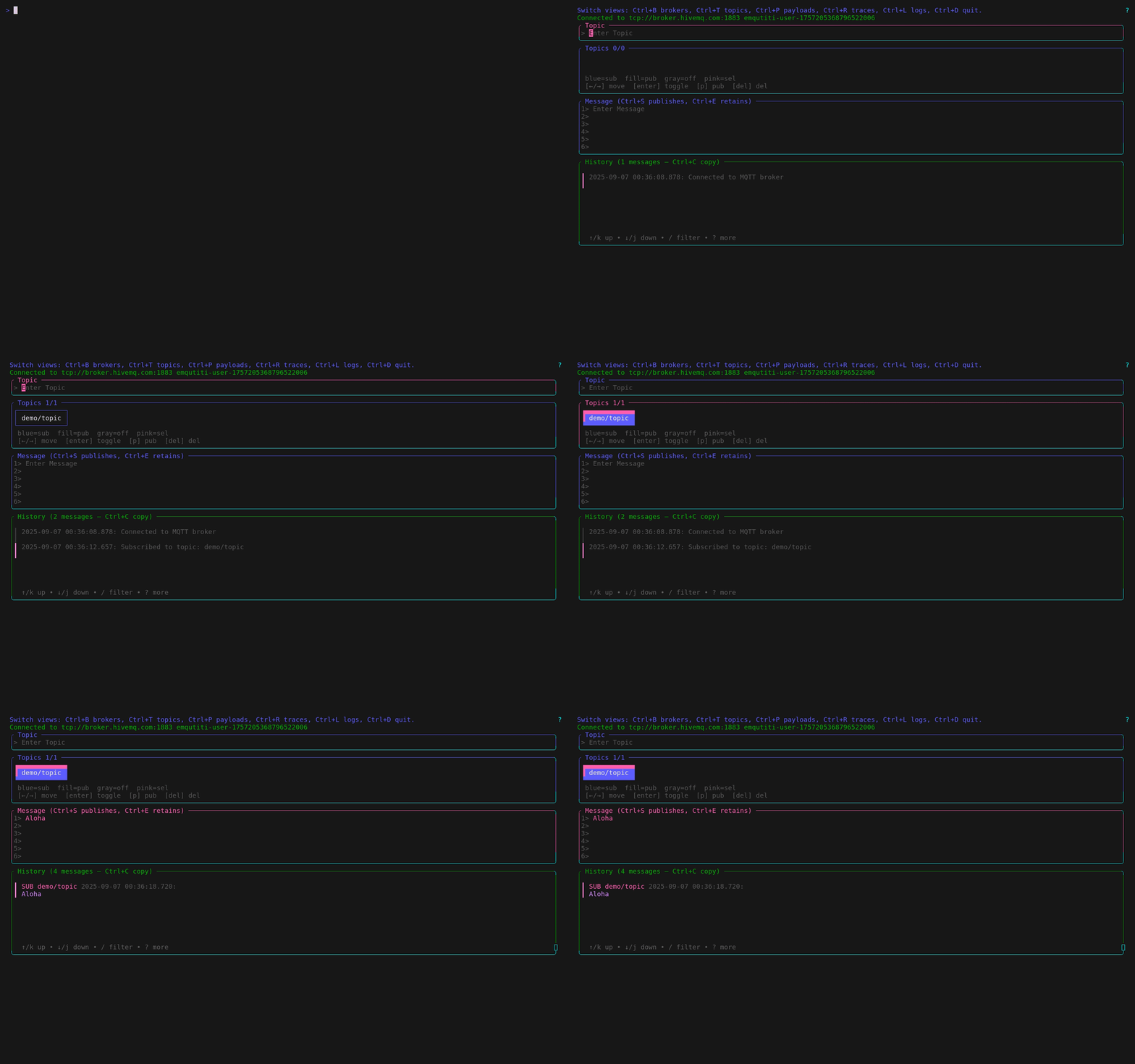
The short demo below shows the app in action.
Add a new connection
Connect to broker, add new topic, create message
Features
- Slick interface for publishing and subscribing
- Manage multiple brokers with one config file
- Credentials stored securely via the OS keyring
- Import CSV files with a friendly wizard
- Persistent history and trace recording, even headless
Installation
Download the current binaries and Linux packages from the
stable download catalog
and verify them with that version's checksums.txt. Native archives, Linux
.deb/.rpm packages, source builds and AUR are the supported channels.
Flatpak distribution is retired; older GitHub bundles remain historical downloads
and receive no further Flatpak updates.
With Go
Starting with v0.8.0, the public module is go.izoone.com/emqutiti:
go install go.izoone.com/emqutiti/cmd/emqutiti@latest
# Or pin the identity release:
go install go.izoone.com/emqutiti/cmd/emqutiti@v0.8.0
Use the normal Go proxy and checksum database defaults. No Entire credentials,
private-module settings or checksum exceptions are needed. Update source imports
from github.com/marang/emqutiti to go.izoone.com/emqutiti; older published
versions keep their original identity and download bytes.
From Source
With the Entire CLI installed and authenticated:
git clone entire://aws-eu-central-1.entire.io/et/marang/emqutiti
cd emqutiti
go install ./cmd/emqutiti
Arch Linux
yay -S emqutiti
Usage
emqutiti
If a profile is marked as default, the app connects to it automatically on start.
Interactive workflow
- In the topic input,
Enteradds and subscribes to a new topic. On a topic chip,Entertoggles subscription,ptoggles the publish target, andDeleteopens a removal confirmation. Typing in inputs or list filters does not run chip commands. - With the message editor focused,
Ctrl+Enterpublishes andCtrl+Shift+Enterpublishes retained. On macOS, useCmd+EnterandCmd+Shift+Enter; the Ctrl combinations also work. PlainEnterinserts a newline. The terminal must send distinct modified-key sequences; see terminal shortcut compatibility. Explicit publish targets take priority; otherwise the selected topic is used. MQTT work runs asynchronously, keeping the UI responsive. - The Message footer keeps publish, retained and newline shortcuts visible regardless of focus. It wraps on narrow terminals without reducing the configured editor rows.
- Pending publishes show their original targets and suppress repeat sends until the current batch finishes. Each request keeps its payload, target, retain flag and broker/client snapshot; the draft remains editable and is not cleared on completion. Results from an old connection are ignored.
- History entries, saved payloads and success pulses follow successful MQTT API results per target. Failures appear in history and the message context; successful targets in a partially failed batch are still recorded. QoS 0 API success does not confirm subscriber delivery.
- Payload
Deleteand right-click require confirmation for the chosen entry, even if the list changes while the dialog is open. Left-click loads the clicked row; clicks outside rows do nothing. - Broker forms, history filters, full message details and long confirmation
content scroll within the terminal. The global shortcut header stays one
row at every width; client context help stays two rows above the content.
Compact hints mark keyboard shortcuts with square brackets, for example
[Enter],[p]and[Ctrl+Enter].
Subscribed chip names have a cyan underline on capable ANSI terminals.
Chips with a pink-filled interior and dark text are the actual publish targets,
including the selected topic when no targets are marked with p. A pink outline
indicates the selected unfilled chip;
neutral borders carry no subscription state. The Message title distinguishes
publish to (selected) from publish to (marked). The Topics legend uses the
same subscription/publish cues with consistently readable text. Publish fills
extend to the inner half of the frame, leaving its outer half unfilled.
Those cues remain visible during border pulses. Subscription
results and list refreshes preserve the selected chip
and its publish fallback. History dates and input hints use adaptive medium gray;
log text and shortcut hints retain higher contrast on light and dark backgrounds.
The heading Topics: N | subscribed: S shows the total topic count and the
subscription count, not the selection position or number of publish targets.
Without color, suffixes show [sub], [pub], [sub,pub] or [off].
See the in-app help guide for form and scrolling shortcuts.
Drag the bottom border of Topics, Message or History to resize its height.
Release applies the change; Esc cancels the drag. Ctrl+Shift+Up/Down resizes
the focused panel and Ctrl+R resets it. Heights are bounded by the terminal;
switching views preserves them. Switching views during a drag cancels it.
Importing from CSV
Launch emqutiti -i data.csv -p local (or --import data.csv --profile local) to map columns to JSON and publish them. The wizard supports dry runs and will remember settings in future versions.
Press Alt+R in the UI to manage recorded traces.
Headless tracing
Run traces without the UI:
emqutiti --trace run1 --topics "sensors/#" -p local
Flags:
General
-i, --import FILELaunch import wizard with optional file path (e.g.,-i data.csv)-p, --profile NAMEConnection profile name to use (e.g.,-p local)-l, --list-profilesList available connection profiles and exit
Trace
--trace KEYTrace key name to store messages (e.g.,--trace run1)--topics LISTComma-separated topics to trace (e.g.,--topics "sensors/#")--start TIMEOptional RFC3339 start time (e.g.,--start "2025-08-05T11:47:00Z")--end TIMEOptional RFC3339 end time (e.g.,--end "2025-08-05T11:49:00Z")- omit
-p/--profilewith--traceto choose a connection profile interactively before the trace starts
Times must be RFC3339 formatted.
Example scheduled run:
emqutiti --trace myrun --topics "sensors/#" -p local --start "2025-08-05T11:47:00Z" --end "2025-08-05T11:49:00Z"
Traces are stored under ~/.config/emqutiti/data/<profile>/traces and can
be viewed in the application (run emqutiti and press Alt+R in the app
to view traces).
Configuration
Profiles and proxy settings live in ~/.config/emqutiti/config.toml. Other
clients read the proxy_addr field to locate the gRPC database proxy. If it is
missing, the app starts one on 127.0.0.1:54321 and records the chosen
address.
Minimal config example:
proxy_addr = "127.0.0.1:54321"
default_profile = "local"

[[profiles]]
name     = "local"
schema   = "tcp"
host     = "localhost"
port     = 1883
username = "user"
password = "keyring:emqutiti-local/user"
Tips:
-
schemacan bemqtt,mqtts,tcp,ssl,ws, orwss. -
More options like TLS and session settings are available; see the
configpackage for details. -
Set
random_id_suffix = truefor unique client IDs. -
Set
skip_tls_verify = trueto bypass TLS certificate checks (useful for self-signed brokers). -
Use
ca_cert_path,client_cert_path, andclient_key_pathto specify TLS certificates. -
Enable Load from env to read variables such as
EMQUTITI_LOCAL_SKIP_TLS_VERIFYorEMQUTITI_LOCAL_BROKER_PASSWORD. -
Set
EMQUTITI_DEFAULT_PASSWORDto override profile passwords when not loading from env. -
Set
default_profileto auto-connect on launch. UseCtrl+Oin the broker manager to toggle it.
Shortcuts
Global
| Action | Key |
|---|---|
| Exit the program | Ctrl+D |
| Manage payloads | Ctrl+P |
| Manage topics | Ctrl+T |
| Manage traces | Alt+R |
| Open broker manager | Ctrl+B |
| Disconnect from broker after confirmation and offer to reconnect immediately or return to the broker manager | Ctrl+X |
| Publish message (message editor focused) | Ctrl+Enter; macOS: Cmd+Enter |
| Publish retained message (message editor focused) | Ctrl+Shift+Enter; macOS: Cmd+Shift+Enter |
| Open log viewer | Ctrl+L |
| Resize panels | Ctrl+Shift+Up / Ctrl+Shift+Down |
| Reset focused client panel height | Ctrl+R |
| Scroll current view | Ctrl+Up/Ctrl+Down or Ctrl+K/Ctrl+J |
Navigation
| Action | Key |
|---|---|
| Back | Esc |
| Cycle focus | Tab / Shift+Tab |
| Scroll focused list | Up/Down or j/k (outside text entry) |
| Switch pane | Left / Right |
Broker Manager
Ctrl+Xdisconnects the active brokerCtrl+Otoggles the default profile- In broker forms,
Tab/Shift+Tabreveals the focused field;Ctrl+Up/Ctrl+Downor the mouse wheel scrolls.Entersaves andEsccancels; their footer remains visible.
History View
| Key | Action |
|---|---|
| Space / Shift+Space | Toggle current selection without clearing other marks |
| Shift+Up / Shift+Down | Extend selection |
| Ctrl+A | Select all |
| Ctrl+C | Copy selected history entries |
| a | Archive selected messages |
| Delete | Remove selected messages |
| / | Filter messages |
| Ctrl+F | Clear all history filters |
| Enter | View full message |
With History focused, Shift+Up / Shift+Down selects a range of entries;
Shift+Click adds a mouse range without clearing existing marks. Space /
Shift+Space toggles just the current entry. Ctrl+C copies selected
entries, or the current entry when nothing is selected. MQTT entries include
the topic and full payload; multiple entries are separated by newlines.
Range selection is unavailable in archived history.
Publishing uses only modified Enter in the focused Message editor:
Ctrl+Enter sends normally, Ctrl+Shift+Enter sets MQTT's retained flag.
On macOS, Cmd+Enter and Cmd+Shift+Enter are the equivalents.
Ctrl+S and Ctrl+E no longer publish. The input adapter supports Linux and
macOS TTY input with distinct terminal sequences; plain Enter stays a newline.
With terminal input and output, Emqutiti requests Kitty keyboard disambiguation
and layout-aware shifted keys while the fullscreen TUI is active and restores
the previous mode on exit, including startup failures. Supporting terminals
distinguish modified Enter without extra configuration. If the terminal or
multiplexer does not support this protocol,
configure a distinct key mapping.
Other input platforms currently cannot publish via these shortcuts.
Emqutiti does not change your terminal configuration. See
terminal shortcut compatibility.
Retained messages are labeled "(retained)".
To remove a retained value, select its topic as the publish target, completely
empty the Message editor (no spaces or newlines) and publish retained.
This clears retained values for all publish targets shown in the Message title;
normal publishing does not clear them, and local history stays unchanged.
In history filters, Tab / Shift+Tab moves between fields, PgUp /
PgDown or the mouse wheel scrolls, Enter applies and Esc cancels.
Full details wrap the complete payload for scrolling; Ctrl+C copies it
and Esc returns. Long confirmations scroll while y / n stays visible;
Esc also cancels.
License
This project is licensed under the terms of the MIT License. See LICENSE for details.
Testing
Run tests with make test (vet and go test ./...). External services are
stubbed; integration tests use isolated loopback MQTT, proxy and TLS servers.
Linux terminal-input tests also use local pseudo-terminals. Run
go test -race ./... to check concurrent code.
The example ExampleSet_manual in keyring_util_test.go touches the real
system keyring and is skipped by default. Run it only when a keyring is
available:
go test -run ExampleSet_manual -tags manual
Tests also cover configuration parsing and saved state persistence.
Before sending a pull request run go vet ./... along with the tests to catch
common mistakes.
Additional notes for repository contributors are available in AGENTS.md.
Development
Building
Go 1.26.11 or newer is required, including the release toolchain's security fixes.
Build and start the local binary:
make build
./dist/emqutiti
The build embeds the current Git tag/commit and marks uncommitted changes dirty.
Common tasks
make build– compiledist/emqutitimake test– rungo vetand unit testsmake proto– regenerate gRPC code fromproxy/proxy.protomake tape– record demos from.tapescripts
Dependency updates
Dependabot checks Go modules (including indirect dependencies) and GitHub
Actions every Monday at 06:00 Europe/Vienna. Minor and patch updates are
grouped per ecosystem; major updates get separate pull requests.
Configuration lives in .github/dependabot.yml and becomes active once it
is on the default branch.
The test workflow runs make test on pull requests and pushes to main,
including Dependabot pull requests. A scheduled and on-PR govulncheck workflow checks reachable vulnerabilities.
GitHub Actions are pinned to immutable commits. Updates still require review and merge;
application version tags and releases remain manual.
The repository-owned Dagu pipeline also checks exact native Entire commits with vet, tests, race detection, GoReleaser validation and the pinned vulnerability scan. It retains build artifacts on the accepted OVH London worker. Its five-minute watcher reads native branch/tag refs; repository pushes do not install workflow definitions. Native Entire supplies this pipeline; existing GitHub releases remain preserved as historical downloads.
Creating documentation
Recording demos for new features and howtos
Run make tape to execute docs/scripts/record_tapes.sh locally. The script
uses a helper container to render GIFs from the .tape files, so you don't
need vhs installed on your machine. make tape builds docs/scripts/ Dockerfile.vhs, which bundles vhs, ffmpeg, ttyd, and chromium, then
runs docs/scripts/record_tapes.sh. GIF files are written to docs/assets/;
the source tapes live under docs/. The client tape demonstrates composing a
draft: VHS's xterm.js backend does not emit distinct modified-Enter sequences,
so it cannot demonstrate the new publish shortcuts without a custom mapping.
If vhs is already on your PATH, you can regenerate an individual
GIF with:
vhs -o docs/assets/create_connection.gif docs/create_connection.tape
VHS replays the tape automatically in its recorder terminal.
Releasing
Native release builds require a strict vMAJOR.MINOR.PATCH tag, its full commit
on native main, and docs/releases/TAG.md in that commit. The Dagu watcher
dispatches new tags after its initial baseline. The release controller runs the
Go checks and GoReleaser builds, retains their artifacts, then requests the
non-root Arch source build and verified server-side AUR metadata publication.
After AUR succeeds, the protected controller verifies that successful native
build's artifacts and publishes the Go downloads
with an immutable version directory and download catalog. Starting with v0.8.0,
checksums also cover go-module.info, go-module.mod and go-module.zip. The
same publisher repairs go-module-versions.txt from complete immutable releases;
https://go.izoone.com/proxy serves the standard module protocol from those files.
See .dagu/README.md for provisioning and publication boundaries.
.goreleaser.yaml preserves Linux, macOS and Windows archives for amd64/arm64,
plus Linux .deb and .rpm packages. Native jobs disable GoReleaser publishing
and announcements. Dagu artifacts are available with their run; the fixed
controller publishes new Go downloads from successful native release children.
Native version tags stay on Entire and are not mirrored to GitHub. Existing
GitHub release history remains available with its original asset bytes. The
v0.7.15 Go asset import preserves the original bytes and tag identity; it creates
no new tag. The protected Dagu publisher is the sole AUR metadata writer.
Flatpak manifests, vendor metadata and release jobs are no longer maintained.
Release builds inject the tag version into
go.izoone.com/emqutiti/cmd.version, so --version reports that version.
The native release procedure is documented in
the Go/AUR release guide.
Preparing a maintenance release
Update PKGBUILD, regenerate .SRCINFO with makepkg --printsrcinfo, and add
docs/releases/vVERSION.md in a reviewed change. Run make test,
go test -race ./..., relevant runtime checks and goreleaser check before
tagging merged native main. AUR publication pins the native source archive to
the verified commit and records its SHA-256. New versions default to pkgrel=1;
republishing changed metadata for the current version requires a reviewed
revision bump, such as pkgrel=2.
Retired Flatpak distribution
LAB-457 retires Flatpak packaging and future Flatpak releases. Existing bundles and dated release notes stay available as historical records. Use the native Go downloads or the AUR package for maintained builds. This change does not uninstall applications or migrate/delete local settings.