
Secure Your Repositories with Reference State Logs
Git is great at remembering commits. Less so at remembering what happened to the references pointing at them over a repository’s lifetime. A Git server can tell you where a branch or tag points today, but what if you want to know where it pointed yesterday? Was a tag ever overwritten? Was a branch force-pushed and later restored?
Some Git forges provide activity and audit logs to help answer these questions. But those records live outside the repository, often behind proprietary web interfaces or APIs. Developers have no standard Git-native way to check that the history hasn’t been rewritten since they last inspected it, or to correlate a push with a specific, verifiable audit-log entry. We believe this history belongs in Git itself, where developers can inspect it, verify its integrity, keep track of how it changes over time, and take it with them wherever they want their repo to be hosted.
Today, we are excited to introduce server-side support for OpenSSF gittuf’s Reference State Log (RSL), making Entire the first Git forge to automatically maintain a gittuf RSL for its repositories. The RSL is a cryptographically verifiable, append-only ledger of Git ref changes, stored directly in the repository. Even when a tag is deleted or a branch is force-pushed, the ledger retains a record of those changes. Entire-native repos now record updates to your default branches and tags automatically, without requiring any changes to your Git workflow. You can inspect the history of your branches with the open-source RSL plugin for the Entire CLI, or verify references directly using gittuf.
When Git References Can’t Be Trusted
Git refs are mutable by design. Branches move forward, get rebased, and sometimes get force-pushed to entirely different histories. Tags can also be moved, deleted, or recreated. That’s perfectly normal for branches. Release tags are a different story. Once a version is published, we generally expect its tag to keep pointing to the same code. Git doesn’t enforce that expectation.
Case in point: In March 2026, attackers compromised credentials belonging to Aqua Security, the maintainers of Trivy, a widely used open-source vulnerability scanner.
The attackers force-pushed 76 out of 77 existing release tags in aquasecurity/trivy-action to malicious commits containing credential-stealing code. Any CI workflow that referenced those tags could execute the attacker’s code without changing a single line of their workflow configuration. The tag names were the same, but what they pointed to wasn’t.
Protected tags and repository rules can help prevent this sort of attack. But what happens if a privileged account is compromised, or someone with sufficient access bypasses those protections? You also need to know what actually happened, even if the affected reference has since been restored.
This is where the RSL comes in. While an RSL won’t stop a malicious push, it makes those changes much harder to hide.
How It Works
Each time a recorded reference changes, Entire appends an entry to refs/gittuf/reference-state-log: a Git commit recording which ref moved and where it now points, built on the entry before it, forming a chain that you can trace back to the beginning of the ledger. The RSL entry has its own number and Git object ID. Entire reports the entry number during the push, allowing you to look up exactly what was recorded using:
$ git push
...
remote: RSL: entry #3 recorded

$ entire rsl entry 3 --fetch
Consider a release tag that gets overwritten and later restored. Looking at the repository today, v0.4.2 points to Commit A, exactly where it started. Nothing about the tag itself tells you it ever pointed elsewhere. But the RSL still has a record of that intermediate change:
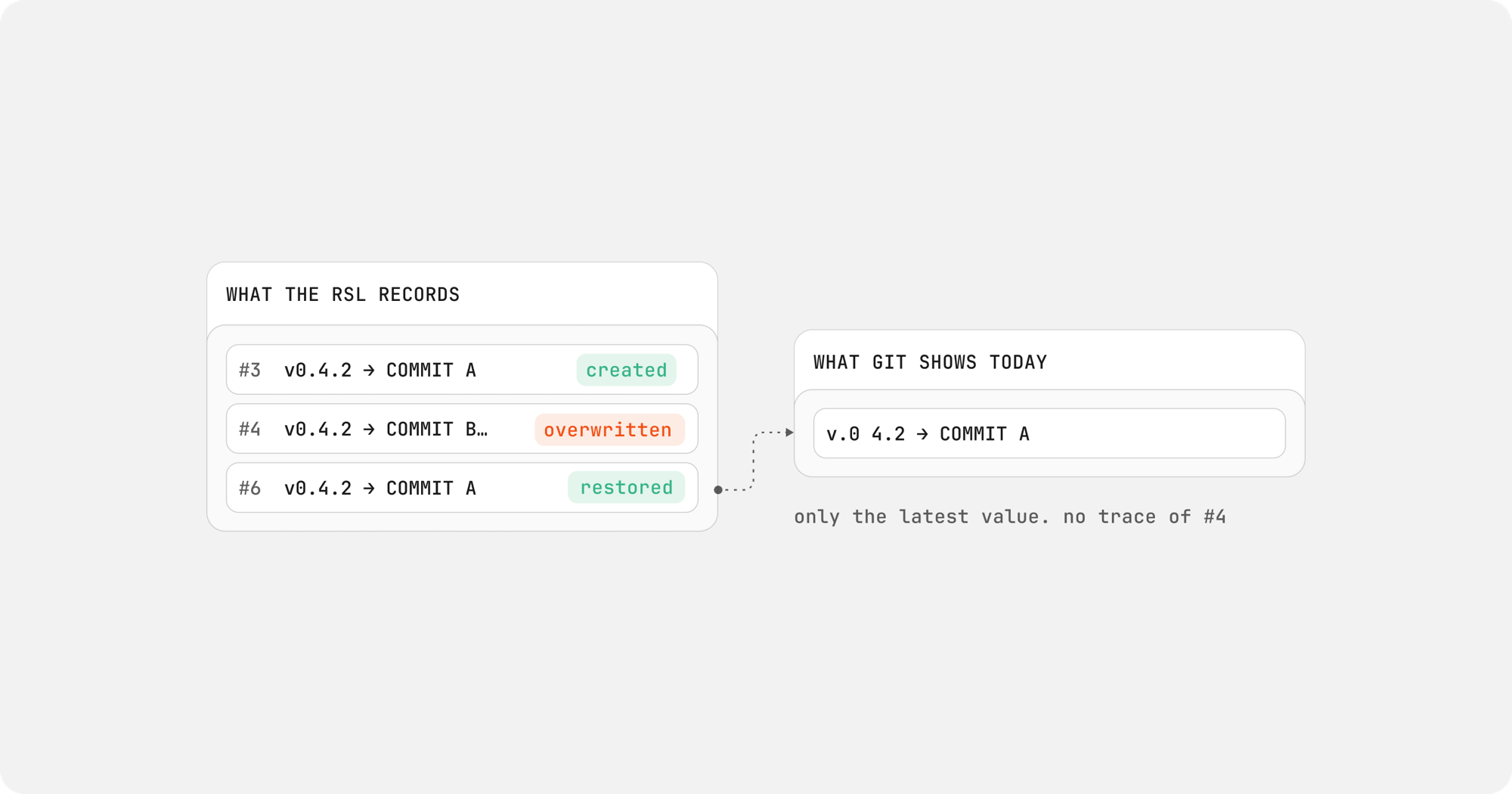
The same applies when a tag is deleted and recreated. To demonstrate, I created the tag v0.4.2, deleted it, and pushed the delete and the recreation pointing at a different commit. Interacting with the repository, you’d only see its new target.
Using the RSL plugin, an open-source plugin for the Entire CLI, shows the whole history:
$ entire rsl tag v0.4.2 --fetch
...
History (3 of 3 entries, newest first)
NUMBER  ENTRY         TARGET        TIME                  BY     SIGNER                SKIPPED
6       08106ebd91a5  db483910f350  2026-11-08T21:32:42Z  pjbgf  Entire aws-eu-west-2  -
4       f7cdf681e9d8  000000000000  2026-11-08T21:30:17Z  pjbgf  Entire aws-eu-west-2  -
3       0937cd25181b  ca633fdf5524  2026-11-08T21:20:50Z  pjbgf  Entire aws-eu-west-2  -
The tag was created in entry #3, deleted in #4, and recreated against a different commit in #6.
Because the log is stored as a series of Git objects, it can be fetched and examined using Git-compatible tooling. Each entry is cryptographically signed and linked to the previous entry, making changes to the recorded history detectable.
Entire’s RSL plugin also enforces fast-forward updates when refreshing the ledger. If the remote ledger no longer extends the history you’ve previously fetched, the plugin refuses to replace your local copy:
$ entire rsl refresh
Fetching gittuf refs from origin...
REF                              STATUS    LOCAL         REMOTE        COMMITS
refs/gittuf/policy               diverged  09453e9fcd6b  3c10d240a940  remote +1, local +1
refs/gittuf/reference-state-log  diverged  af1a45c4374e  e8fd6c33f64b  remote +1, local +14 (entry #14 → #1)

Warning: refs/gittuf/policy was left at 09453e9fcd6b: the remote's 3c10d240a940 does not descend from it
Warning: refs/gittuf/reference-state-log was left at af1a45c4374e: the remote's e8fd6c33f64b does not descend from it
The local ledger remains untouched. This means developers can detect when the remote ledger no longer extends the history they’ve previously fetched, rather than silently accepting a replacement.
Each RSL entry is now automatically signed by the primary Entire cluster that processed the push, along with additional metadata identifying who pushed the change and when. There’s nothing to configure and no signing keys to manage.
What’s Next
You may have spotted refs/gittuf/policy in the refresh output. Today, Entire uses this policy to define which cluster keys are authorized to sign RSL entries.
The policy includes keys from every cluster your repository is mirrored to, and is updated as the repository is mirrored to new regions. While only the primary cluster normally signs RSL entries, including the others will allow a secondary region to take over if needed, without changing the repository’s signing policy.
For now, only Entire can change the policy, but gittuf already covers mechanisms on who can update specific Git references. More on that soon.
To get started, our Reference State Log guide covers installation, inspecting reference history, and verifying your repository’s RSL. As always, let us know what you think by joining our Discord today.