
You Can Now Use Appwrite to Run Your Backend on Entire
You can now create and publish apps and functions hosted from repositories hosted on Entire using Appwrite, the open-source cloud for agents and developers. If you run your backend on Appwrite, this means that you can host your code in the region of your choice with repositories hosted on Entire or mirrors, and now every push to your production becomes a live deployment.
Here’s how to get started:
Meet Appwrite Sites and Appwrite Functions
Appwrite is an open-source cloud that supports essential backend services, including Authentication, Databases, Storage, Functions, Messaging, and Realtime, as well as web hosting for you to build scalable and secure applications. Appwrite Sites and Appwrite Functions now support Entire as a Git provider and you can use repositories hosted on Entire to deploy your applications and functions.
In one loop between Appwrite and Entire, you can deploy web apps on Appwrite Sites directly from source control, while Appwrite Functions run your backend logic without you having to manage servers.
Why Deploy From a Repository on Entire
Repositories on Entire live natively on our distributed Git network. This architecture lets you clone, pull, and push in the region of your choice, keeping your deployment pipeline data resident while pushing faster than any other Git forge on Earth. If your repository is already on GitHub, you can either migrate to Entire completely or mirror your repo to Entire and point Appwrite at the mirror.
Choosing Entire as your Git provider for Appwrite Sites and Functions makes it easy to build with agents. You can review and merge code with Trails, give your agents and team a shared memory with Continuous Memory, and let Appwrite deploy what you merge.
Create an Appwrite Site From Your Repository on Entire
From the Appwrite console, you can connect Entire as the Git provider a few different ways. First, make sure that you have a project created, then go to Project settings, scroll down to Git configuration, and choose Entire as your Git provider.
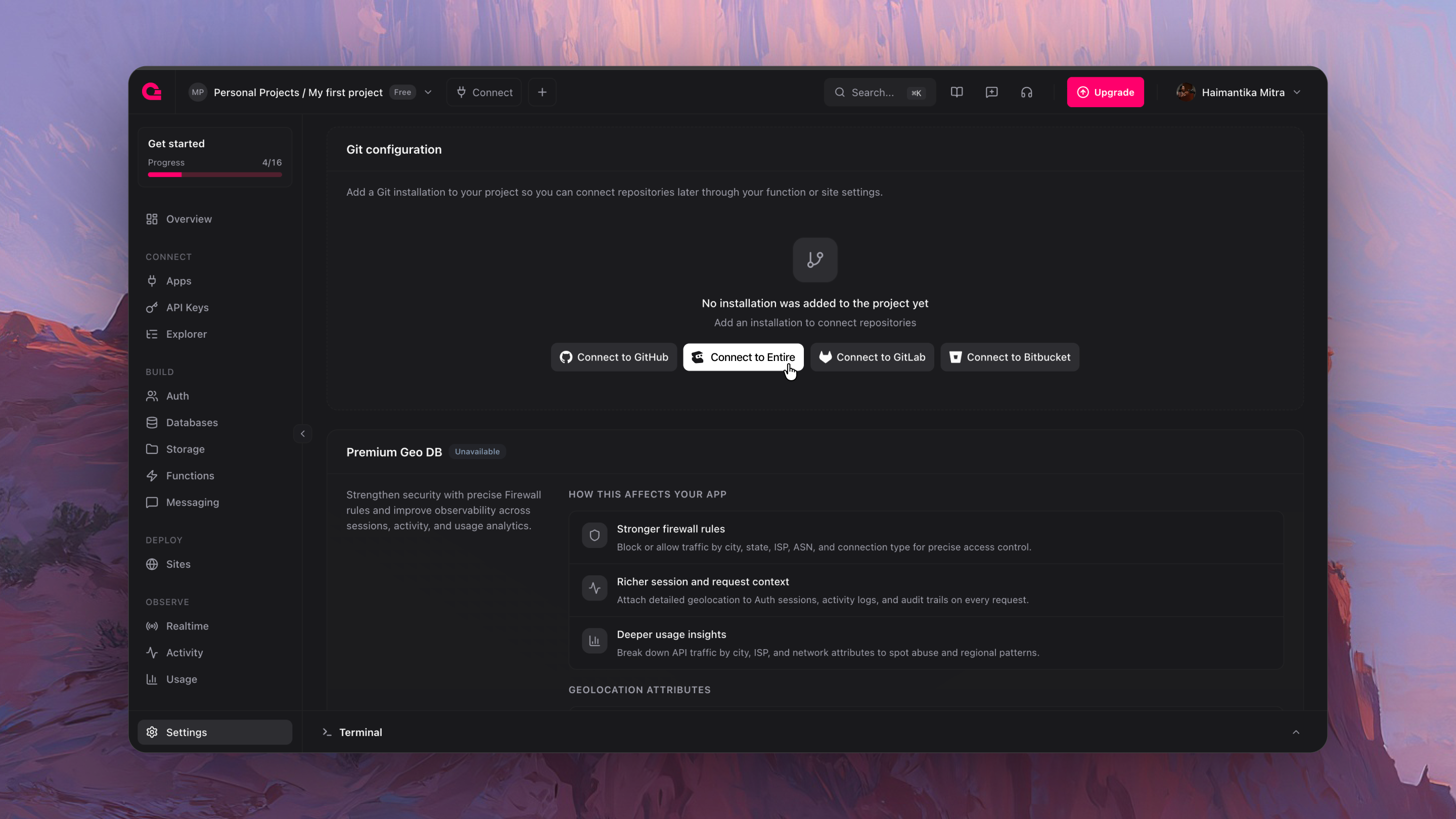
You can also connect it from the empty state when you create your first site. Authorize Appwrite, and then the projects and organizations you have access to on Entire show up as owners in the repository picker.
Next, open Sites from the left sidebar and select Create site. Choose Connect Git provider, then choose Entire, then pick the owner, and select your repository.
Let’s say I’ve got a site called teatime in the afternoontea project. I’d select /et/afternoontea/teatime, which is the same path you’d use with the repository you chose from Entire. Then set your production branch, root directory, and framework. Appwrite detects the common ones and fills in the build command and output directory for you. Add any environment variables, pick a domain, and select Deploy.
From here on, it runs itself. Push to your production branch and Appwrite builds and activates a new deployment. Push to any other branch and you get a preview link that only members of your Appwrite organization can open.
Create an Appwrite Function From Your Repository on Entire
Functions work the same way on the Entire side. Once Entire is connected to your project, open Functions from the left sidebar and select Create function or Browse templates. For example, I use the Generate PDF function template. Then choose the repository from Entire and select Connect.
If you choose to create a new function, just choose a runtime, then set the production branch, root directory, and entrypoint. If your function shares a monorepo with your site, add a path filter under build triggers so only changes in its folder start a build.
Set your execute permissions and any environment variables, then select Create. Appwrite builds your first deployment from the latest commit on your production branch.
After that, every push to that branch ships a new version of your function, and every other branch builds a preview you can test before merging. Commit, branch, and merge links point back to Entire, so you can trace any deployment to the exact change behind it.
Ship One Feature Across Repos With Trails
Most features don’t live in a single repo. Trails lets you group the changes from every repository in an Entire project into one place, and with Appwrite connected, every change on the trail gets its own preview and its own check.
For example, you have an app, where the app, website, and docs each live in their own repo, all inside one Entire project called cosmo. When we authorized Appwrite, we gave it access to all three, so every push becomes a deployment. Now, whenever you ship a feature that touches all three repositories, you can open a project trail and push the changes to each repository. The trail holds all three changes together, so whoever reviews it sees the whole feature, not three disconnected pull requests.
As each branch is pushed, Appwrite builds it and the trail shows the build running. Every change then carries its own Appwrite check and a link to its preview. Entire holds each merge until the Appwrite check passes and the trail is approved. Once everything is green, merge the trail and Appwrite deploys all three sites to production at the same time.
Join the Rebellion
Appwrite joins the growing list of tools that build straight from Entire, and we’re just getting started. More regions, more integrations, and more ways to ship from Entire are on the way. For questions, bug reports, integration requests, and PRs, join us on Discord.