How to Run Custom AI Code Evals on Every Push with Trails
Goodbye, pull requests! Hello, Trails.
The diff in a pull request only shows the files that have changed… not how you approached doing the task with your agent in the first place. So how do you review agent-written code at the speed it’s written? What if review were a loop that ran on every push, with all the relevant context attached?
That’s what Trails are for. A Trail puts eval scores at the top of the page, and review agents recalculate them on every push. Each agent runs independently in a cloud sandbox and returns a score and a rationale, and the Trail shows the current run next to the last five. Instead of reading a timeline of agent comments, you can see whether your coding agent and review agents have looped enough times for the scores to stabilize. You configure each review agent with your own instructions, a model, and a trigger, so the evals measure what matters in your codebase.
Here’s one of my recent Trails with agents that reviewed my work:
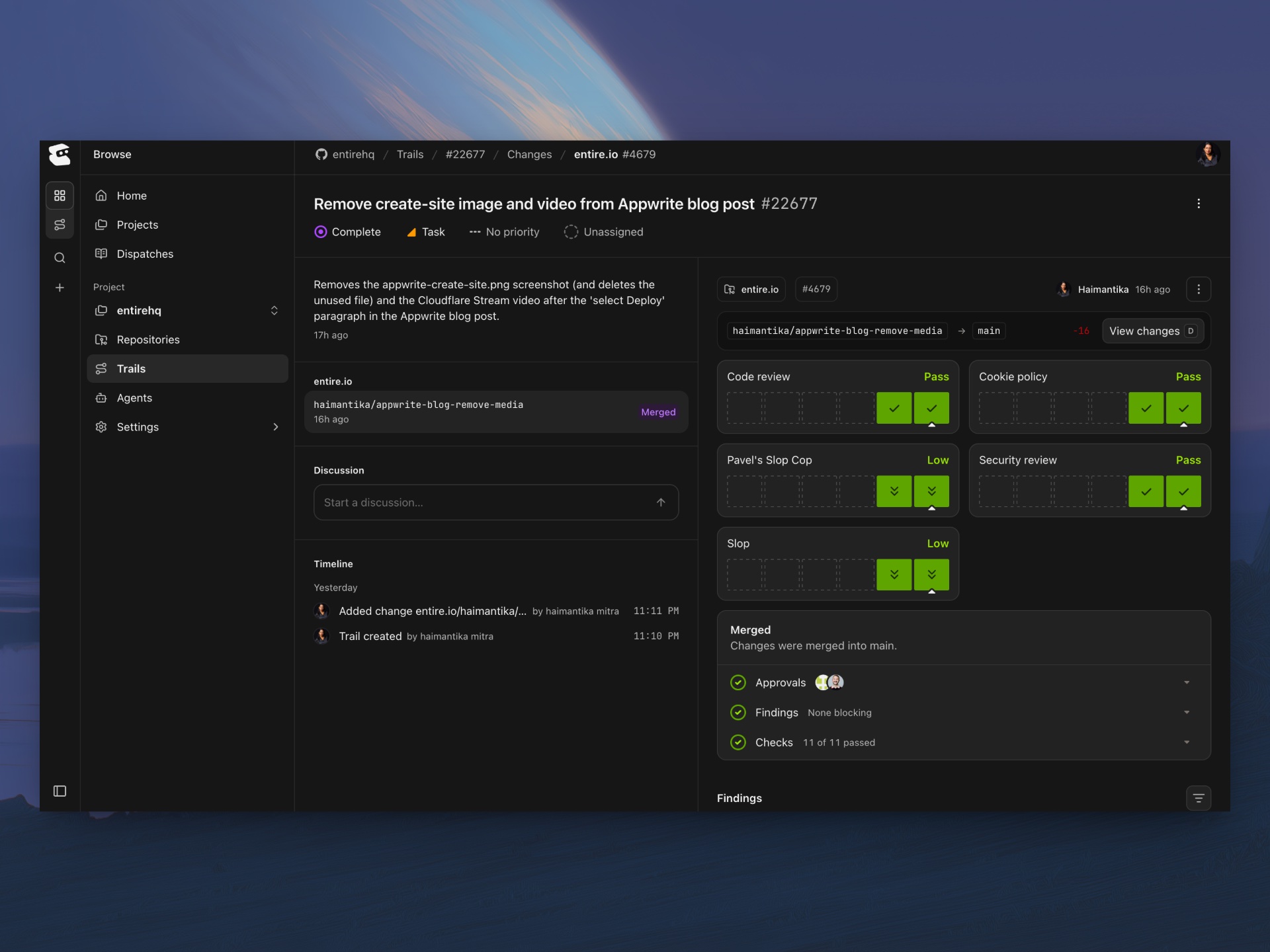
The reviews flag any risks for further human review, and when everything’s green, you’re ready to approve. Here’s how to set up a Trail, turn on preset review agents, and build a custom one that scores database migration risk.
Why Pull Requests Struggle with Agent-Written Code
A pull request shows you a diff and asks a human to review it or use external code review tools. When an agent writes the diff, the reasoning behind it lives in a session on your local machine.
Here’s how a pull request and a Trail differ:
| Pull request | Trails | |
|---|---|---|
| Starts | When code is ready to push | Before code exists, with intent and acceptance criteria, or from a branch |
| Scope | One repository | One or more repositories |
| Context for reviewers | Diff, commits, comments | Diff plus the agent sessions, checkpoints, and timeline that produced it. Findings are problems review agents spot in your code, along with a suggested fix for each. Gates are the merge requirements you set per repository, such as approvals and passing CI. |
| Automated review | Third-party bots | Review agents score every matching push, creating custom evals |
| Signal to merge | Approvals and CI | Stable scores, cleared findings, and the gates you configure, including passing CI from our Buildkite and Depot integrations |
Before You Start
Here’s what you need to configure before getting started:
- An account on entire.com.
- A repository hosted on Entire, or a GitHub repository mirrored to Entire with the Entire GitHub App installed and given access to it.
- Organization-owned repositories may need an org owner to approve the app.
- Repository write access to create Trails and link branches. Configuring review agents also needs permission to manage project agents.
- The Entire CLI, so your coding agent’s sessions and checkpoints are captured next to the code.
- Session capture set up for your coding agents.
Create a Trail
From a feature branch, use the following command to create the Trail, publish the branch, and link them:
$entire trail create --title "Add migration for user preferences"To agree on scope before writing code, add --no-branch. The Trail opens in the planning phase. Push and link the branch later with .
You can also hand this step to your coding agent. Ask it to run first so it finds the right commands. You can find the UI and agent instructions in our official documentation.
Enable Preset Review Agents
Agents live at the project level, so one configuration can cover many repositories. We’ve enabled some presets for all Entire users. To turn one on from the UI:
- Open your project on entire.com and go to Agents, then Manage Agents.
- Enable a preset. Code review flags what needs fixing, Security review checks for changes that could lead to a breach, and Slop catches sloppy patterns and drift.
- Select the repositories it reviews and choose an environment.
You can also enable presets from the CLI with , so your coding agent can set them up for you. See the Agents docs for the commands.
Build a Custom Review Agent for Migration Risk
A custom agent lets you build reviews that are best suited for your repositories.
Database migrations are a good example: a migration can look clean in a diff and still lock a table during rollout or make rollback impossible.
You can create your own review agents for any purpose you want. In Agents, select New agent and fill in:
- Name: Migration Risk
- Description: Evaluates database migration changes for deployment and rollback risks.
- Harness, model, reasoning effort, and timeout: Use a stronger model and a longer timeout here than for style checks.
Then use this set of instructions:
Evaluate database migration risk in the trail's changes. Inspect changed
migrations and related application code for:

1. Destructive operations (dropped columns or tables, data-changing updates).
2. Locking: operations that take long locks on large tables, such as adding
   a non-null column with a default or building an index without CONCURRENTLY.
3. Rollout compatibility: whether old and new application versions can both
   run against the schema during deploy.
4. Rollback safety: whether the down migration restores the previous state
   without data loss.

Score risk from 0 to 100, where higher values mean greater potential damage.
If no migration-related changes exist, return 0 and say so.
Give a short rationale citing the files and lines behind the score, and file
a finding for each issue that needs a fix.
Set the signal and trigger:
- Value type: a 0 to 100 score.
- Polarity: lower is better, because this agent reports higher numbers for more risk.
- Trigger: Trail branch pushed. The other options are Run manually and Recurring schedule.
- Repositories: select at least one, leave Active on, and then select Create agent.
A push trigger runs when its readiness condition and any branch or path filters match an open change. By default, that means the change is ready for review.
Run the Review Loop Until Scores Stabilize
Trails show each agent’s current run next to the last five, so you can see whether repeated loops have converged. Every review agent whose trigger matches scores the change and files findings. Then your coding agent checks each finding against the code, fixes any serious findings, and explains what can be dismissed. Then it pushes again, and the review agents rescore.
Select View changes to see the diff next to the findings. The Trail’s sessions and timeline show what your coding agent decided along the way, which helps you decide whether or not to keep the suggestions your agents made.
Here’s an example of the Slop agent on one of our Trails in our docs repository:
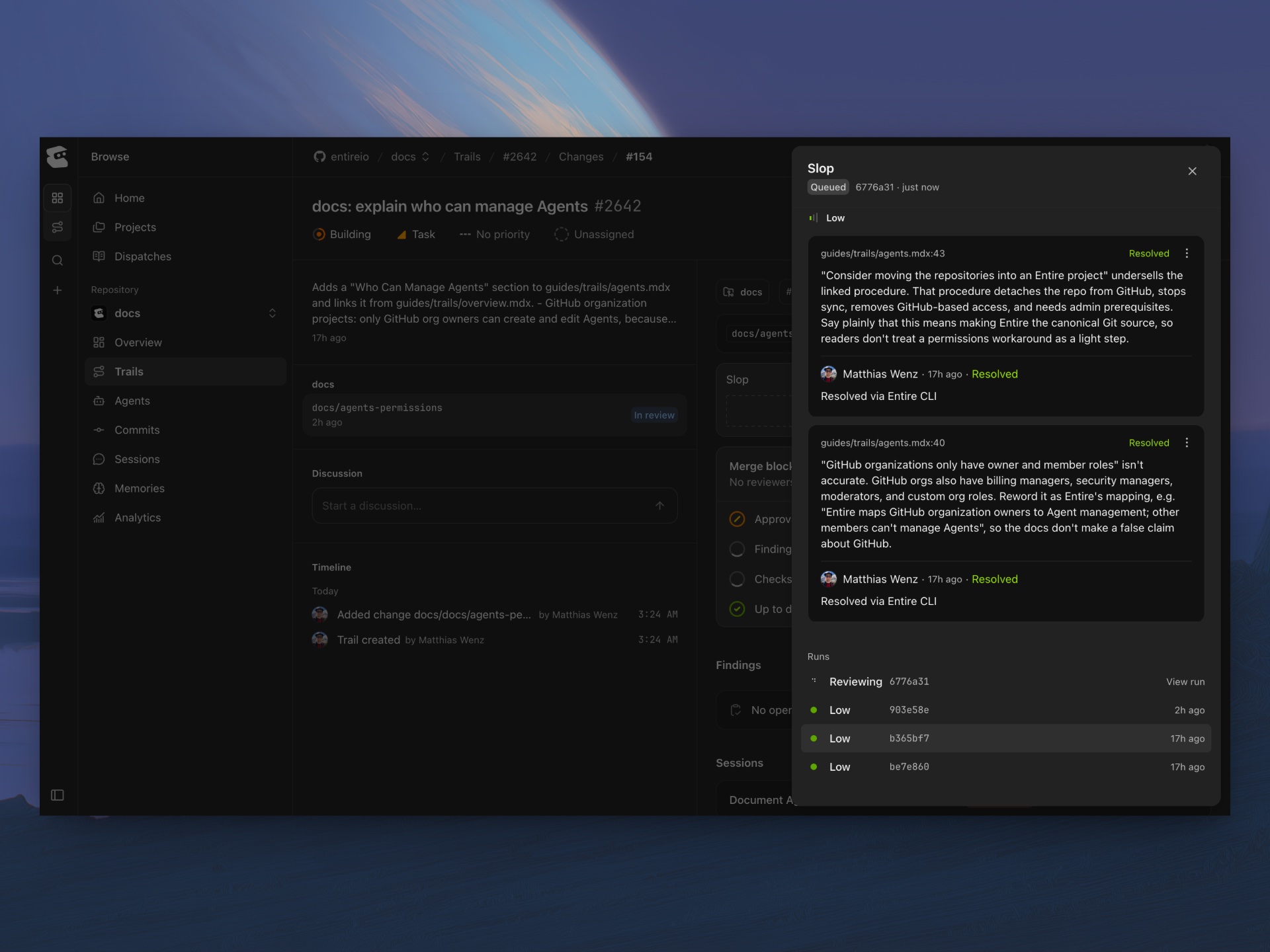
When the scores are steady, you can merge the change.
FAQ
Is a Trail the same as a pull request?
No. A Trail is Entire’s replacement for the pull request in agentic coding. It can start before any code exists, span several repositories, and keep agent sessions and review scores next to each change.
Does an approval on Entire count as a GitHub approval?
No. For repositories mirrored from GitHub, CI and merging go through a linked GitHub pull request. Entire reviews and GitHub reviews are separate, and GitHub branch rules can still block a merge after Entire’s gates pass.
Can one Trail cover changes in several repositories?
Yes. Link a branch from each repository to the same Trail. Each change is reviewed and merged on its own.
Do review agents run automatically?
Only when configured. Creating a Trail doesn’t add any agents. An agent runs on push when its trigger, repository selection, readiness condition, and filters all match.
Which coding agents work with Trails?
Any coding agent can push to a Trail branch. To capture sessions and checkpoints, enable Entire for a supported agent, such as Claude Code or Codex, with .
What happens to findings after I push a fix?
Findings on code that changed may become stale. Stale findings are not automatically resolved or dismissed.
Next Steps
Pick a change your coding agent is already working on. Create a Trail, enable the Slop preset or any of our other presets, and push.
Sign up on Entire and connect a repository to get started. Here are some helpful resources: